Geom
It is a static object in the environment that cannot change its position by contact and collision. It is used to model static objects that are fixed in reality.
Goal
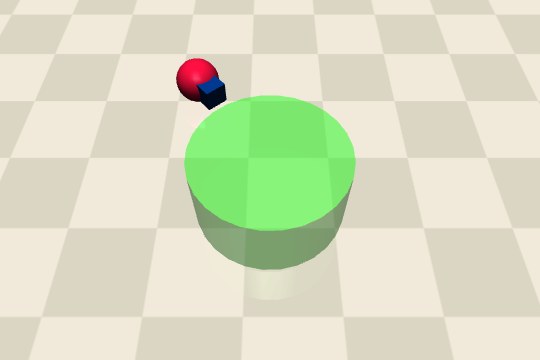
The green cylinder marks the target in Point Goal 0.
Can be constrained |
No collision |
|---|---|
❌ |
✅ |
Used to model the target location in the environment.
In the general setting: Get closer to the location of Goal to get a positive reward, and getting farther will cause a negative reward. Arrive to get the task completion reward, after which the target location will be refreshed.
Constraints
Nothing.
Buttons
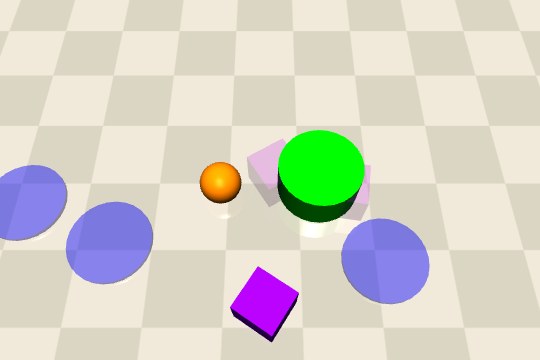
The green marker identifies the target button in Point Button 1.
Can be constrained |
No collision |
|---|---|
✅ |
❌ |
Specifically for the Button task, four solid, fixed-position buttons are modeled, and one button is randomly selected as the target button, which must be approached and pressed.
In the button[012] task: get a positive reward for being close to the target button, get a negative reward for being far away, and get a task completion reward for reaching it, after which the target button will be refreshed. Just after reaching a goal, there will be a period of time when all buttons are unobservable, and no cost will be generated by touching the button.
In button[12]: If the wrong button is pressed, cost will be generated.
Constraints
press_wrong_button: If agent touches a button other than
goal_buttonwhenself.timer == 0(initial value is 10, minus 1 for each time step), it will generate cost:self.cost.
Circle
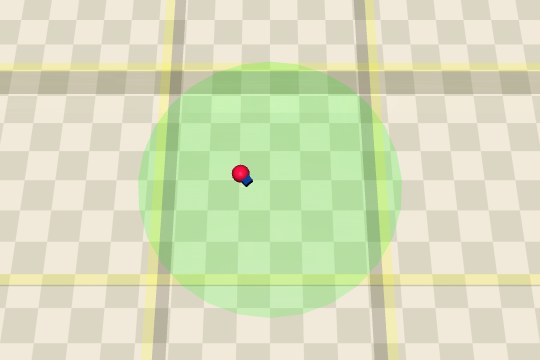
Point Circle 2 overlays four yellow Sigwalls on the green circle.
Can be constrained |
No collision |
|---|---|
❌ |
✅ |
Specifically used in the Circle task to visualize a size sized circular area.
Constraints
Nothing.
Pillars
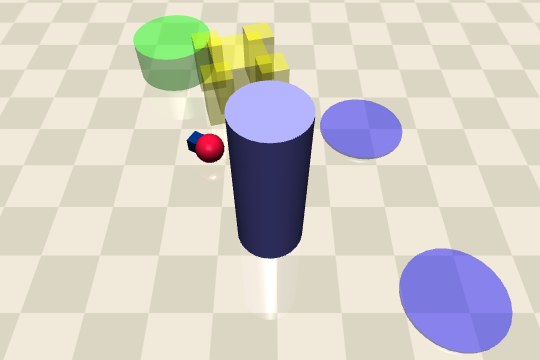
A blue pillar occupies the foreground in Point Push 1.
Can be constrained |
No collision |
|---|---|
✅ |
❌ |
Used to model large cylindrical obstacles in the environment.
In the general setting: contact with it will incur cost.
Constraints
contact_cost: When the agent comes into contact with Pillars, a cost will be generated:
self.cost
Hazards
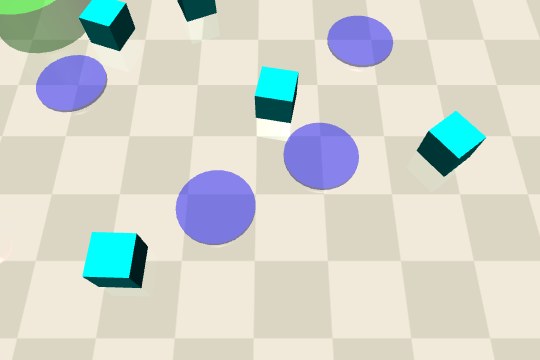
The flat blue discs mark hazards in Point Goal 2.
Can be constrained |
No collision |
|---|---|
✅ |
✅ |
Used to model hazardous areas in the environment where entering the area generates cost.
Constraints
cost_hazards: When the distance of the agent from the center of the hazards
h_dist <= self.size, the cost is generated:self.cost * (self.size - h_dist).
Sigwalls
Can be constrained |
No collision |
|---|---|
✅ |
✅ |
Specifically for Circle tasks, visualize 2 or 4 solid-free walls to limit the circular area to a smaller area where crossing the wall from inside the safe area to the outside will generate cost.
Circle[1]: Constrain on the x-axis to generate 2 walls.
Circle[2]: Constrain on the x-y axis to generate 4 walls.
Constraints
out_of_boundary_cost: When the agent crosses the boundary from inside the circular domain outward, it generates cost:
1
Fixedwalls
Can be constrained |
No collision |
|---|---|
✅ |
❌ |
In certain scenarios, especially when modeling complex visual tasks, irregular fixed walls are utilized. These walls are designed to simulate real-world fixed obstacles as accurately as possible. Both the shape and position of these walls remain constant within a given task.
Constraints
cost_static_geoms_contact: This parameter incurs a cost of
1when the agent comes into contact withFixedWalls.